
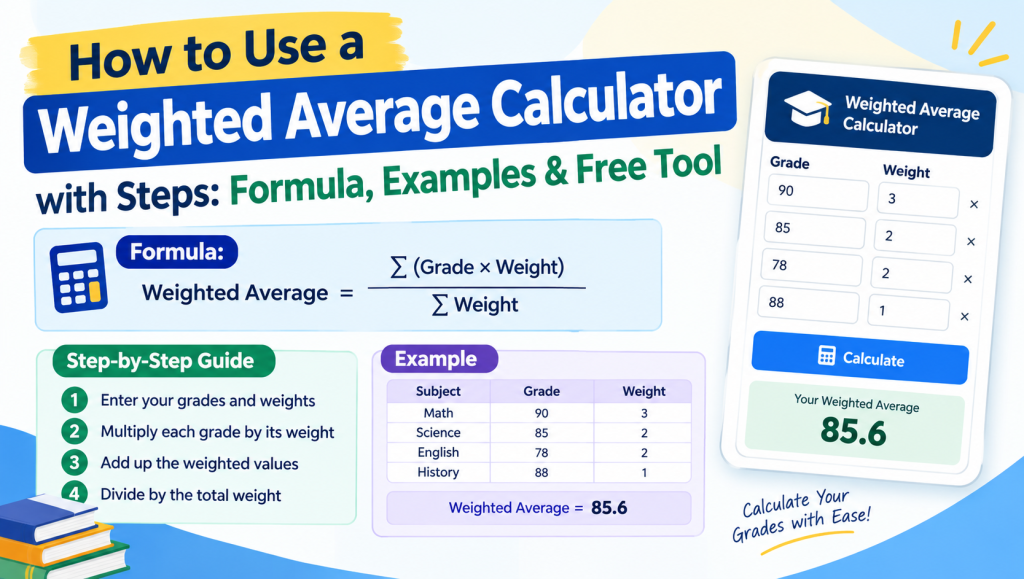
Not every number in a data set deserves equal importance. A final exam counts for more than a weekly quiz, and an investment that makes up half your portfolio affects returns far more than one that makes up five percent. A weighted average calculator solves this by multiplying each value by its weight, adding the results, and dividing by the total weight. A weighted mean calculator does the same job in seconds, which saves time and prevents the small arithmetic slips that are common when working by hand.
Because a weighted average calculator online runs in your browser, there is nothing to install, and it works on a phone, tablet, or computer. A free weighted average calculator lets you run as many calculations as you need without paying or signing up. If you want to understand the math rather than just get an answer, a weighted mean calculator with steps shows every stage, from the products to the final result.
Table of Contents
What Is Weighted Average?
A weighted average, also called a weighted mean or weighted arithmetic mean, is a type of mean in which each of the data points in a dataset counts differently. A simple average treats every number the same, but a calculator accounts for the importance of values by assigning each one a weight. This makes it useful whenever items carry different levels of importance, such as exam scores that make up different percentages of a final grade.
The formula is straightforward: multiply each value by its weight, add the products, and divide by the sum of the weights. With varying weights, the relative importance of each item determines its influence on the final result. Items with larger weights pull the average toward themselves, which means values with more influence shape the outcome more than the rest. For example, if a test worth 60% scores 90 and a quiz worth 40% scores 70, the weighted average is (90 × 0.6 + 70 × 0.4) ÷ 1.0 = 82.

Weighted Average Formula and Notation
The weighted average calculator formula, or weighted mean formula, is x̄w = Σwixi ÷ Σwi, where xi is each value, wi is its weight, and x̄w is the result. The sigma symbol, or summation symbol, means add every term. You multiply each value by its weight, find the sum of products, then divide by sum of weights. The expanded formula is (w1x1 + w2x2 + … + wnxn) ÷ (w1 + w2 + … + wn). Here, the product of value and weight is wixi, the sum of weighted products is Σ(value × weight) (or Σwixi), and the sum of weights is Σwi. Example: values 80 and 90 with weights 2 and 3 give (160 + 270) ÷ 5 = 86.
The formula and input rules are simple: use equal-length lists so each value has one weight, use nonnegative weights, and remember that zero weights simply drop a value from the result. You also need at least one positive weight, or the division is impossible.
Check this also: How to use the weighted grade calculator
How to Use the Calculator (Inputs and Features)
How to use the weighted average calculator is simple: enter data values in the data values field, then enter weights in the weights field. Some versions use a values column and a weights column instead, with one pair per row. For comma-separated values, just separate with commas, such as 80, 90, 75. Most calculators also accept spaces, tabs, line breaks, or semicolons, so you can use whichever format is easiest. If you work in decimal-comma locales, where 7,5 means 7.5, use semicolons or line breaks as separators so the calculator doesn’t confuse decimals with list breaks.
To save time, paste from spreadsheet data directly. Copy and paste two columns from Excel, and the tabs and line breaks will be read automatically. Make sure both lists are the same length, then click calculate to see your result.

How to Calculate Weighted Average (Steps and Examples)
How to calculate weighted average (or how to calculate weighted mean) takes three steps. This is a manual calculation, so you can calculate by hand with just a pen or a basic calculator.
Step 1: Multiply each value by its weight.
Step 2: Add all the weights and add all the products.
Step 3: Divide the sum of products by the sum of weights.
Worked example: Suppose your class grades are based on three scores: an assignment score (homework) of 78 worth 20%, a midterm exam of 84 worth 30%, and a final exam of 90 worth 50%. A quiz or any other item is added the same way.
Solution (substituting values):
- Step 1: 78 × 0.20 = 15.6; 84 × 0.30 = 25.2; 90 × 0.50 = 45
- Step 2: Sum of products = 15.6 + 25.2 + 45 = 85.8; sum of weights = 0.20 + 0.30 + 0.50 = 1
- Step 3: 85.8 ÷ 1 = 85.8
Final answer: 85.8
Solved example with repeated values: When a grade shows up more than once, count how many times each grade appears. This count is its frequency, and it acts as the weight. In this example problem, a student scores 70 twice and 95 once on quizzes. The calculation is (70 × 2 + 95 × 1) ÷ (2 + 1) = 235 ÷ 3 = 78.33.
Visit this also: Percentage Grade Calculator – Calculate Your Grade Easily
Calculator Outputs and Results
A good calculator returns more than one number. The table below shows what each output means.
| Output | What It Shows | Example |
|---|---|---|
| Weighted average calculator result (or weighted mean result) | The final answer, an accurate result returned as an instant calculation | 86 |
| Sum of weights | The total of all weights used as the divisor | 5 |
| Number of valid pairs | How many value-and-weight pairs were counted | 2 |
| Weighted product table | Each value, its weight, and their product in one grid | 80 × 2 = 160; 90 × 3 = 270 |
| Calculation breakdown | The totals behind the answer: 160 + 270 = 430, then 430 ÷ 5 | 86 |
| Step-by-step solution (or step-by-step breakdown) | A clear solution listing the calculation steps, showing how the value was obtained | Multiply, add, divide |
| Simple mean comparison | The plain average next to the weighted one, to show the effect of weighting | 85 vs. 86 |
| Decimal places and rounded result | Control over precision, with the answer rounded to your chosen decimal places | 86.00 or 86 |

Applications and Use Cases
The most common use of a weighted average calculator is calculating course grades. Teachers use grade weighting to decide how much each of the course components counts toward the final grade, and students can use the same method to see where they stand. With weighted grades, a final exam might carry more influence than a quiz, so exam weights are usually higher than assignment weights. These weights are typically given as percentages, but they can also be relative weights or frequencies, such as how many times a score appears.
Weighted averages also power GPA with credit hours. A four-credits course affects your GPA more than a one-credit course, so each grade is multiplied by its credit hours before the total is divided by all the credit hours taken.
Frequently Asked Questions About Weighted Average Calculator
What is a weighted average calculator?
A weighted average calculator is a tool that finds an average where each value has a different level of importance. You enter your values and their weights, and it multiplies each value by its weight, adds the products, and divides by the sum of weights to give an accurate result instantly.
How do you calculate a weighted average?
Multiply each value by its weight, add all the products, then divide by the sum of the weights. For example, scores of 78, 84, and 90 with weights of 20%, 30%, and 50% give (15.6 + 25.2 + 45) ÷ 1 = 85.8.
Is the weighted mean the same as the weighted average?
Yes. Weighted mean, weighted average, and weighted arithmetic mean all describe the same calculation. The formula is x̄w = Σwixi ÷ Σwi, so a weighted mean calculator and a weighted average calculator give identical results.
Can I use a weighted average calculator for grades and GPA?
Yes. It is widely used for course grades, where exams, quizzes, and homework carry different weights, and for GPA, where each grade is weighted by its credit hours. This helps students see exactly how each course component affects the final grade.
What is the difference between a weighted average and a simple average?
A simple average treats every value equally, while a weighted average gives more influence to values with larger weights. If all weights are equal, both methods return the same result. If the weights differ, the weighted average reflects the true importance of each value.
Conclusion
A weighted average calculator turns a slow, error-prone task into an instant one. What is a weighted mean? It is an average in which each value counts according to its weight, and what is the formula? x̄w = Σwixi ÷ Σwi. What does this calculator do? It multiplies each value by its weight, adds the products, divides by the sum of weights, and shows the steps. Is weighted mean the same as weighted average calculator? Yes, the terms are interchangeable.
Use it when to use weighted mean instead of regular mean applies: whenever your values carry different importance, as with grades, GPA, or costs. What happens if all weights are equal? The result matches the simple mean. Can weights be percentages? Yes, as percentages, decimals, or frequencies. Can weights be zero? Yes, they simply drop a value, as long as at least one weight is positive. Can weights be negative? No, weights should be nonnegative. Try the calculator now for a fast, accurate result.


