
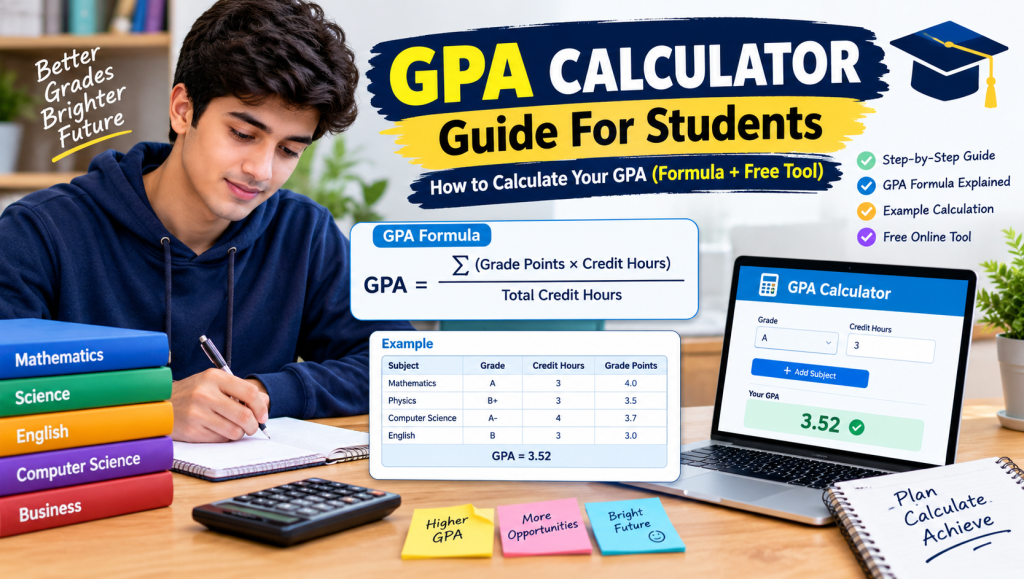
A GPA calculator guide turns your grades and credit hours into one clear number, so you always know where you stand. A college GPA calculator and a high school GPA calculator both handle this, with the latter often supporting weighted classes. Use a semester GPA calculator guide for a single term, or a cumulative GPA calculator (also called an overall GPA calculator) for your full record. Students in many countries know these as an SGPA calculator guide and a CGPA calculator guide.
Planning ahead is where these tools shine. A projected GPA calculator guide shows your projected semester GPA and projected cumulative GPA before exams begin, while a final grade calculator and weighted grade calculator reveal the score you need on your last test. Best of all, a free GPA calculator guide that works as an online GPA calculator needs no installation, and an easy-to-use GPA calculator acts as both a GPA estimator and GPA tracker, a simple grade calculator that keeps your goals in view.
Table of Contents

How to Calculate GPA (Formula and Steps)
Learning how to calculate GPA is easier than most students expect. The GPA formula is a simple mathematical formula: GPA = total quality points ÷ total credit hours. This step-by-step guide shows the GPA calculation steps you need to calculate GPA for one semester and then calculate overall GPA across your whole degree.
Step 1: Convert each letter grade to grade points. On the common 4.0 scale, A = 4.0, B = 3.0, C = 2.0, D = 1.0, and F = 0.
Step 2: Multiply grade by credit hours. For each course, multiply the grade points by the course’s credit hours to get its quality points. A 3-credit course with an A gives 3 × 4.0 = 12 quality points.
Step 3: Add up the totals. Add all your total quality points (also called honor points), then add your total attempted credits. This is the same as your total credit hours for the term.
Step 4: Divide total honor points by credit hours. The result is your GPA, and most schools report it as a GPA rounded to two decimal places.
Example (one semester):
| Course | Credit Hours | Grade | Grade Points | Quality Points |
|---|---|---|---|---|
| Math | 3 | A | 4.0 | 12 |
| English | 3 | B | 3.0 | 9 |
| Biology | 4 | B | 3.0 | 12 |
| History | 2 | A | 4.0 | 8 |
| Total | 12 | 41 |
41 ÷ 12 = 3.4167, so the semester GPA is 3.42.
To calculate overall GPA, don’t average your semester GPAs. Add the quality points from every term, add the credit hours from every term, and divide once. If your next semester earns 45 quality points over 15 credits, your overall GPA is (41 + 45) ÷ (12 + 15) = 86 ÷ 27 = 3.19.
Quality Points, Honor Points and Credit Hours
Quality points (also called honor points or grade index) are your numeric grade multiplied by a course’s credit hours. A 4-credit B (3.0) gives 4 × 3.0 = 12 quality points, so heavier courses move your average more.
Attempted credits are all the credits you registered for, while earned credits are only those you passed. GPA hours are the credits that count toward your average, and pass/fail courses are often excluded. Your current GPA is your current quality points ÷ current GPA hours, so keep track of your total credits and total courses to keep it accurate.
Visit this: Percentage Grade Calculator – Calculate Your Grade Easily
GPA Scale and Grade Conversion
The 4.0 GPA scale is the most common GPA scale in the US and makes grade conversion simple. Use it for letter grade to GPA, percentage to GPA, or GPA to letter grade, but check your school’s official grading scale, since cutoffs vary. An A+ grade and A grade are 4.0 at most schools, an A- grade is 3.7, a B+ grade is 3.3, a B grade is 3.0, and a B- grade is 2.7. A C+ grade is 2.3, a C grade is 2.0, a C- grade is 1.7, a D+ grade is 1.3, a D grade is 1.0, and an F grade is 0.0.
A 4.0 GPA means straight A’s, a 3.7 GPA is an A- average, and a 3.3 GPA is a B+ average. A 3.0 GPA is a solid B, a 2.0 GPA is a C and often the minimum for good standing, and a 0.0 GPA means failing every course.

Semester GPA vs Cumulative GPA
Semester GPA (also called SGPA or term GPA) measures your grades for one term only. Cumulative GPA (or CGPA) is your overall GPA, an ongoing average that combines every term you’ve completed. A strong semester can lift it, but it moves slowly because older credits still count.
Together, they show your average performance and academic performance over time. Your cumulative GPA also decides your academic standing, such as good standing or probation, so it’s the best way to track academic progress. In a calculator, click add semester for a new term, then add course and add assessment for each item. Enter each course grade (or class grade) in the grade column and its credits in the credit column.
Special Grades and Exceptions
Not every grade counts toward your GPA. An audit grade gives no credit, and a withdraw grade (W) usually has no effect on your average. An incomplete grade (I) stays pending until the work is done, and a suspended grade is held while a case is reviewed. Courses graded credit / non-credit, pass / fail, satisfactory / unsatisfactory, or S/U grades may earn credit but are typically courses not counted in GPA. Still, they can count toward graduation requirements, including liberal core courses.
A transfer credit counts toward your degree, but transferred courses often don’t enter your GPA. After a change of major, check which classes still apply. For a repeated course or retaken course, many schools use grade replacement, where the new grade replaces the old one. At some schools, an F replaced by R means the failing grade no longer affects your average. Policies vary, so confirm the rules with your registrar.
Check on this also: How to use the GPA calculator
Grade Tracking and Calculator Features
A good GPA calculator guide does more than add numbers. Here are the features that make grade tracking simple:
- Track grades: Track class grades across every course and see your class performance at a glance.
- Add assessments: Add assessments like quizzes, assignments, and exams to build each course total.
- Weighted grade calculations: Handle weighted grade calculations when items count differently.
- Calculate grades: Calculate grades and calculate class grades in one place.
- Quick calculation: Get a quick calculation with instant results as you type.
- Simple interface: A simple interface keeps the process stress-free.
- Mobile-friendly: A mobile-friendly design works on any phone.
- Save progress: Save your grades and save progress so you can check your grades anytime.
- Reset calculator: Use reset calculator to start fresh each term.

Improving Your GPA and Academic Support
Wondering how to raise GPA or how to improve GPA? Start by setting clear GPA goals and class goals for each term. Use a calculator to find what you need on your final and your target grade, so you know exactly where to focus. Strong study skills and smart study tips, like planning weekly reviews and starting assignments early, will help you raise your grades and improve grades steadily. This is the best way to boost your GPA and keep up your GPA over time.
You don’t have to do it alone. Your school’s academic success center offers academic support such as tutoring, supplemental instruction, and peer success coaching. Visit early in the semester, before small problems become big ones.
FAQs About GPA Calculator Guide
What is a GPA calculator guide and how does it work?
A GPA calculator guide converts your letter grades and credit hours into one grade point average. Enter each course, its credits, and your grade, and it does the math.
How do I calculate my cumulative GPA?
Add the quality points from every semester and divide by your total credit hours. Don’t average your semester GPAs.
What is the difference between weighted and unweighted GPA?
An unweighted GPA treats every class equally on a 4.0 scale. A weighted GPA gives extra points for AP, IB, or Honors classes.
Can a GPA calculator guide help me plan my future grades?
Yes. A projected GPA calculator guide shows your future semester and cumulative GPA, and a final grade calculator shows the score you need on your last exam.
Do pass/fail, withdrawn, and repeated courses count toward my GPA?
Usually not for pass/fail or withdrawn courses. For repeated courses, many schools replace the old grade with the new one, so confirm with your registrar.
Conclusion
A GPA calculator guide is one of the simplest ways to take control of your grades. Whether you use a college GPA calculator or a high school GPA calculator, you can see where you stand in seconds. A semester GPA calculator shows how one term went, while a cumulative GPA calculator tracks your progress across your whole degree.
To plan ahead, a projected GPA calculator guide helps you set realistic targets before exams begin. Start using one today, and keep your academic goals within reach.


